Key Highlights
- A healthcare CRM manages the complete patient journey, not just communications.
- The right CRM improves patient engagement and satisfaction.
- Automation reduces missed appointments and manual administrative work.
- Healthcare CRMs integrate with EHR, HMS, and billing systems.
- Security and regulatory compliance should be top priorities.
- Choosing scalable software supports long-term organizational growth.
- Healthcare-specific CRMs offer capabilities beyond traditional CRM platforms.
- A structured evaluation framework helps avoid costly implementation mistakes.
- Successful implementation depends on proper planning and user adoption.
- Webtree develops custom healthcare CRM solutions tailored to healthcare workflows.
How to Choose a Healthcare CRM System That Improves Patient Experience and Operations
Healthcare organizations today are expected to deliver exceptional patient experiences while managing increasingly complex clinical and administrative operations. Patients want convenient appointment scheduling, timely communication, personalized care, and seamless follow-ups across every stage of their healthcare journey.
According to Deloitte’s 2025 Global Health Care Outlook, healthcare organizations worldwide continue to prioritize digital transformation, with many health systems investing in AI, cloud platforms, and connected technologies to improve patient experience, operational efficiency, and workforce productivity.
Unfortunately, many hospitals and clinics still rely on disconnected systems, manual processes, or generic customer relationship management tools that fail to address the unique needs of healthcare providers. These challenges often result in missed appointments, delayed communication, fragmented patient records, and lower patient satisfaction.
This is where a Healthcare CRM System makes a significant difference.
Unlike traditional CRM platforms that primarily focus on sales and customer acquisition, healthcare CRM solutions are designed specifically to strengthen patient relationships, streamline communication, automate routine workflows, and improve operational efficiency across the entire patient lifecycle.
However, not every CRM solution is built the same. Selecting the wrong platform can create integration challenges, increase administrative workload, and limit future growth.
This guide explains what healthcare organizations should evaluate before investing in a healthcare CRM system and provides a practical framework for choosing a solution that supports both patient engagement and long-term operational success.
What Is a Healthcare CRM?
A Healthcare CRM (Customer Relationship Management) System is software designed to help hospitals, clinics, diagnostic centers, and other healthcare providers manage patient interactions throughout the entire care journey.
Instead of focusing on sales opportunities, a healthcare CRM focuses on building stronger patient relationships by centralizing communication, appointment management, follow-ups, engagement campaigns, and patient history.
The system enables healthcare teams to deliver consistent, personalized communication while reducing manual administrative tasks.
Patient Journey Managed by a Healthcare CRM
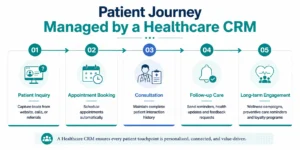 By maintaining a complete view of every patient interaction, healthcare organizations can provide more personalized care while improving operational efficiency.
Why Healthcare Organizations Need a CRM
Modern healthcare organizations face growing pressure to improve patient experiences while managing increasing operational complexity. Administrative teams often spend valuable time handling repetitive tasks such as appointment reminders, follow-up calls, and manual data entry.
At the same time, patients expect faster responses, personalized communication, and convenient digital interactions.
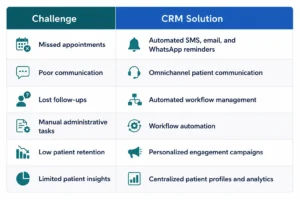
Without a centralized CRM platform, hospitals frequently encounter challenges such as:
- Missed appointments
- Poor patient follow-ups
- Fragmented communication
- Disconnected patient information
- Low patient retention
- Increased administrative workload
These issues not only affect patient satisfaction but can also impact operational efficiency and revenue.
A healthcare CRM helps eliminate these challenges through automation, centralized patient management, and intelligent communication workflows.
Common Challenges and CRM Solutions
Benefits of Implementing a Healthcare CRM
A well-designed healthcare CRM delivers measurable improvements across multiple areas of the organization.
Improved Patient Engagement
Personalized communication keeps patients informed throughout their care journey, increasing trust and encouraging long-term relationships.
Reduced No-Shows
Automated appointment reminders significantly reduce missed appointments while helping healthcare providers optimize scheduling.
Greater Operational Efficiency
Routine administrative processes such as appointment confirmations, follow-ups, patient onboarding, and communication campaigns can be automated, allowing staff to focus on patient care.
Better Care Coordination
With centralized patient information, clinical and administrative teams can collaborate more effectively, ensuring continuity of care.
Data-Driven Decision Making
Built-in dashboards and reporting tools provide valuable insights into patient engagement, operational performance, appointment trends, and service utilization.
Ultimately, a healthcare CRM helps organizations deliver a more connected, patient-centric experience while improving efficiency across departments.
Healthcare CRM vs Traditional CRM
Many healthcare organizations initially evaluate general CRM platforms because they are widely recognized and often appear more affordable. While these solutions work well for sales teams and customer management, they are not designed to address the complexities of healthcare operations.
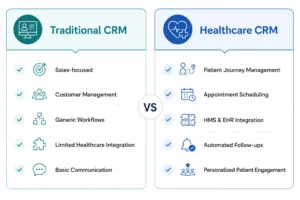
A Healthcare CRM System goes beyond managing contacts. It supports the entire patient journey, from the first inquiry and appointment scheduling to treatment follow-ups, preventive care reminders, and long-term patient engagement.
Unlike traditional CRMs, healthcare-specific platforms integrate with hospital management systems (HMS), electronic health records (EHR), billing software, and patient portals. This enables seamless information sharing while ensuring healthcare providers have a complete view of every patient interaction.
For organizations focused on improving patient experience and operational efficiency, a healthcare CRM offers capabilities that traditional CRM platforms simply cannot provide.
Essential Features Every Healthcare CRM Should Have
Choosing the right CRM is about more than selecting software with the longest feature list. The best healthcare CRM systems include tools that simplify daily operations, improve patient engagement, and integrate seamlessly with existing healthcare technologies.
Here are the must-have features to prioritize.
1. Comprehensive Patient Profiles
A centralized patient profile gives healthcare providers access to appointment history, communication records, medical preferences, feedback, and engagement history in one place.
This enables personalized communication while improving care coordination across departments.
2. Appointment Management
An effective healthcare CRM should simplify appointment scheduling, confirmations, cancellations, and rescheduling.
Automated reminders through SMS, email, or WhatsApp help reduce missed appointments while minimizing manual administrative work.
3. Omnichannel Patient Communication
Patients expect convenient communication through multiple channels.
A modern CRM should support:
- Email
- SMS
- WhatsApp
- Phone integration
- Patient portals
- Web forms
- Live chat
Maintaining communication history across every channel ensures consistent patient interactions.
4. Automated Follow-Up Workflows
Patient engagement shouldn’t end after an appointment.
Healthcare CRM software can automatically send:
- Post-treatment instructions
- Medication reminders
- Preventive care notifications
- Annual health check reminders
- Feedback surveys
- Wellness campaign messages
Automation ensures patients remain engaged without increasing staff workload.
5. Marketing and Patient Engagement Tools
Healthcare organizations also need to build long-term relationships with patients.
Built-in marketing capabilities can support:
- Health awareness campaigns
- Vaccination reminders
- Seasonal wellness programs
- New service announcements
- Patient education newsletters
These campaigns help strengthen patient loyalty while encouraging preventive healthcare.
6. Analytics and Reporting
Data-driven insights enable healthcare organizations to continuously improve operations.
Look for dashboards that provide visibility into:
- Appointment trends
- No-show rates
- Patient satisfaction
- Campaign performance
- Staff productivity
- Patient retention
Real-time reporting helps leaders make informed operational decisions.
7. Integration Capabilities
Healthcare software should work as part of a connected ecosystem.
Ensure the CRM integrates with:
- Hospital Management Systems (HMS)
- Electronic Health Records (EHR)
- Billing systems
- Laboratory software
- Telemedicine platforms
- Payment gateways
Strong integration reduces duplicate data entry while improving operational efficiency.
8. Security and Compliance
Healthcare organizations handle highly sensitive patient information.
Your CRM should include:
- Role-based access controls
- Data encryption
- Audit logs
- Secure cloud infrastructure
- Regulatory compliance support
- Backup and disaster recovery
Security should be a core capability, not an afterthought.
Modern healthcare CRM systems are becoming even more powerful with AI-driven capabilities such as intelligent patient segmentation, automated communication, predictive analytics, and workflow automation. Explore our guide on AI in healthcare use cases to discover how artificial intelligence is transforming patient engagement, hospital operations, and clinical workflows beyond traditional chatbots.
Also Read
Hospital Management Software vs ERP: Which Solution Is Right for Your Healthcare Organization?
Confused about whether your hospital needs a Hospital Management System (HMS), an ERP solution, or both? Learn the key differences, benefits, and ideal use cases for each system to make an informed technology investment that supports operational efficiency, financial management, and better patient care.
How to Choose the Right Healthcare CRM System
With numerous healthcare CRM platforms available, selecting the right one can feel overwhelming. Rather than comparing feature lists alone, healthcare organizations should evaluate each solution against their operational goals, technical requirements, and long-term growth plans.
The following seven-step framework provides a practical approach to making an informed investment.
Step 1: Define Your Business Objectives
Start by identifying the challenges you want the CRM to solve.
Ask questions such as:
- Do we want to improve patient engagement?
- Are missed appointments affecting operations?
- Do we need better communication across departments?
- Are manual administrative tasks slowing our staff?
Clearly defined objectives will guide the selection process and help prioritize features.
Step 2: Map the Patient Journey
Evaluate every stage of the patient experience, from the first inquiry to post-treatment follow-ups.
Understanding where delays, communication gaps, or inefficiencies occur allows you to select a CRM that supports each stage effectively.
Step 3: Assess Integration Requirements
A CRM should fit into your existing technology ecosystem rather than operate independently.
Evaluate compatibility with:
- Hospital Management Systems
- Electronic Health Records
- Billing software
- Telemedicine platforms
- Laboratory systems
- Third-party APIs
Seamless integration minimizes disruptions and improves data accuracy.
Step 4: Evaluate Communication Capabilities
Choose a CRM that supports communication through your patients’ preferred channels.
Look for solutions offering:
- SMS reminders
- Email automation
- WhatsApp messaging
- Patient portals
- Feedback collection
- Marketing campaigns
Consistent communication strengthens patient relationships and improves satisfaction.
Step 5: Review Security and Compliance
Healthcare data requires the highest levels of protection.
Ensure the platform provides:
- Secure authentication
- Role-based permissions
- Data encryption
- Audit trails
- Compliance with applicable healthcare regulations
Robust security safeguards both patient trust and organizational integrity.
Step 6: Consider Scalability
Your healthcare organization will continue to evolve.
Select a CRM that can accommodate:
- Additional locations
- Higher patient volumes
- New specialties
- Expanded services
- Future technology integrations
Scalable software protects your investment and supports long-term growth.
Step 7: Calculate the Total Cost of Ownership
Look beyond the initial purchase price.
Consider costs related to:
- Customization
- Integration
- User training
- Maintenance
- Ongoing support
- Future upgrades
A solution with a slightly higher upfront investment may deliver significantly greater value over time.
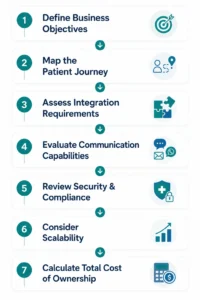 Following this structured evaluation framework enables healthcare organizations to choose a CRM that aligns with both current operational needs and future growth.
Common Mistakes When Selecting a Healthcare CRM
Even the most feature-rich CRM can fail to deliver value if it is selected without a clear strategy. Avoiding these common mistakes can save both time and implementation costs.
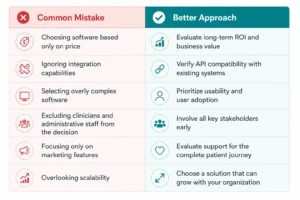
Selecting the right healthcare CRM is not just about purchasing software. It is about investing in a platform that improves patient experiences, streamlines operations, and supports sustainable organizational growth.
Selecting the right healthcare CRM is an important step, but it delivers the greatest value when it’s part of a broader digital transformation strategy. By integrating CRM with systems such as EHR, HMS, ERP, and AI-powered solutions, healthcare organizations can improve patient engagement, streamline operations, and create connected care experiences. Explore our Healthcare Digital Transformation Roadmap to learn how to plan and implement a successful transformation journey.
CRM Implementation Best Practices
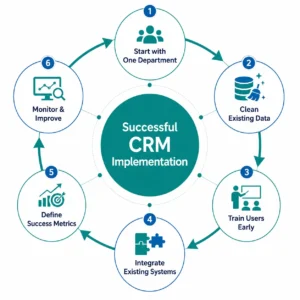
Selecting the right Healthcare CRM System is only the first step. A successful implementation requires careful planning, stakeholder involvement, and continuous optimization. Even the most advanced CRM can fail to deliver value if users are not trained properly or if the system is not aligned with existing workflows.
Following proven implementation practices helps healthcare organizations maximize adoption, minimize disruption, and achieve faster returns on investment.
Start with One Department
Instead of deploying the CRM across the entire organization at once, begin with a pilot department such as outpatient services, patient registration, or customer support.
A phased rollout allows teams to identify challenges early, gather user feedback, and refine workflows before expanding the system across the organization.
Clean and Organize Existing Data
Migrating inaccurate or duplicate patient records into a new CRM can create long-term problems.
Before implementation:
- Remove duplicate records
- Verify patient contact information
- Standardize data formats
- Archive outdated information
- Define data ownership
Clean data improves reporting accuracy and enhances patient communication from day one.
Train Users Early
Technology adoption depends on people, not just software.
Provide role-specific training for:
- Hospital administrators
- Front desk staff
- Marketing teams
- Patient coordinators
- Clinical support teams
Hands-on training sessions and clear documentation help employees feel confident using the new platform and reduce resistance to change.
Integrate with Existing Systems
Healthcare organizations rely on multiple applications to manage patient care and operations. A CRM should function as part of this connected ecosystem.
Ensure seamless integration with:
- Hospital Management Systems (HMS)
- Electronic Health Records (EHR)
- Billing and payment systems
- Laboratory information systems
- Telemedicine platforms
- Patient portals
Integrated systems reduce manual data entry, improve accuracy, and provide a unified view of patient information.
Define Success Metrics
Before implementation begins, establish measurable goals that align with your organization’s objectives.
Examples include:
- Reduction in missed appointments
- Improvement in patient retention
- Faster response times
- Increased appointment bookings
- Higher patient satisfaction scores
- Reduced administrative workload
Tracking these KPIs helps evaluate the effectiveness of the CRM and identify areas for improvement.
Monitor Adoption and Continuously Improve
Implementation is an ongoing process rather than a one-time project.
Regularly review user feedback, system performance, and operational metrics to refine workflows, introduce new automations, and ensure the CRM continues to meet evolving business needs.
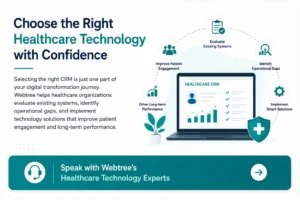
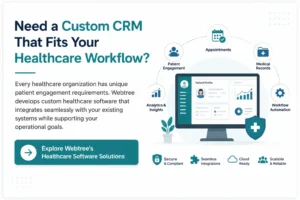
Every healthcare organization has unique operational workflows, patient engagement strategies, and technology requirements. Off-the-shelf CRM platforms may address basic needs, but they often require significant customization to align with existing healthcare processes.
At Webtree, we work closely with hospitals, clinics, diagnostic centers, and healthcare providers to develop technology solutions that enhance patient experiences while improving operational efficiency.
Our approach begins with understanding your current systems, identifying workflow challenges, and recommending solutions that support your long-term digital transformation goals.
Our healthcare software expertise includes:
- Custom Healthcare CRM Development
- CRM Integration with HMS and EHR Systems
- Patient Engagement Platforms
- Appointment Scheduling and Reminder Automation
- Patient Portals
- Workflow Automation
- Cloud-Based Healthcare Applications
- Healthcare Analytics Dashboards
- Ongoing Technical Support and System Optimization
Whether you’re modernizing an existing CRM, integrating multiple healthcare systems, or developing a custom patient relationship management platform from the ground up, Webtree delivers scalable solutions tailored to your organization’s needs.
By combining healthcare technology expertise with a consultative approach, we help organizations improve communication, streamline operations, and build lasting patient relationships.
Frequently Asked Questions
1. What is a Healthcare CRM System?
A Healthcare CRM System is software designed to manage patient relationships, automate communication, streamline administrative workflows, and improve patient engagement throughout the entire care journey.
2. How is a Healthcare CRM different from a traditional CRM?
Traditional CRMs primarily focus on sales and customer management, while healthcare CRMs are designed specifically for patient relationship management, appointment scheduling, care coordination, and integration with healthcare systems such as EHR and HMS.
3. What features should a healthcare CRM include?
Essential features include patient profiles, appointment scheduling, automated reminders, omnichannel communication, workflow automation, analytics dashboards, EHR integration, billing integration, and robust security controls.
4. Can a healthcare CRM integrate with existing hospital systems?
Yes. Modern healthcare CRM solutions can integrate with Hospital Management Systems (HMS), Electronic Health Records (EHR), billing platforms, laboratory systems, telemedicine applications, and patient portals.
5. How does a healthcare CRM improve patient engagement?
It enables personalized communication, automated appointment reminders, follow-up messages, health awareness campaigns, and ongoing patient engagement, creating a more connected and satisfying patient experience.
6. Is a healthcare CRM suitable for small clinics?
Yes. Healthcare CRM solutions can be tailored to organizations of all sizes, from single-specialty clinics to large multi-location hospitals, allowing them to scale as the organization grows.
7. What should healthcare organizations consider before choosing a CRM?
Organizations should evaluate business objectives, integration capabilities, ease of use, security, scalability, automation features, implementation support, and total cost of ownership before making a decision.
8. Why should healthcare providers chooseWebtreefor healthcare CRM solutions?
Webtree offers custom healthcare CRM development, seamless integration with existing healthcare systems, workflow automation, patient engagement solutions, and long-term technical support to help healthcare organizations improve efficiency and deliver better patient experiences.